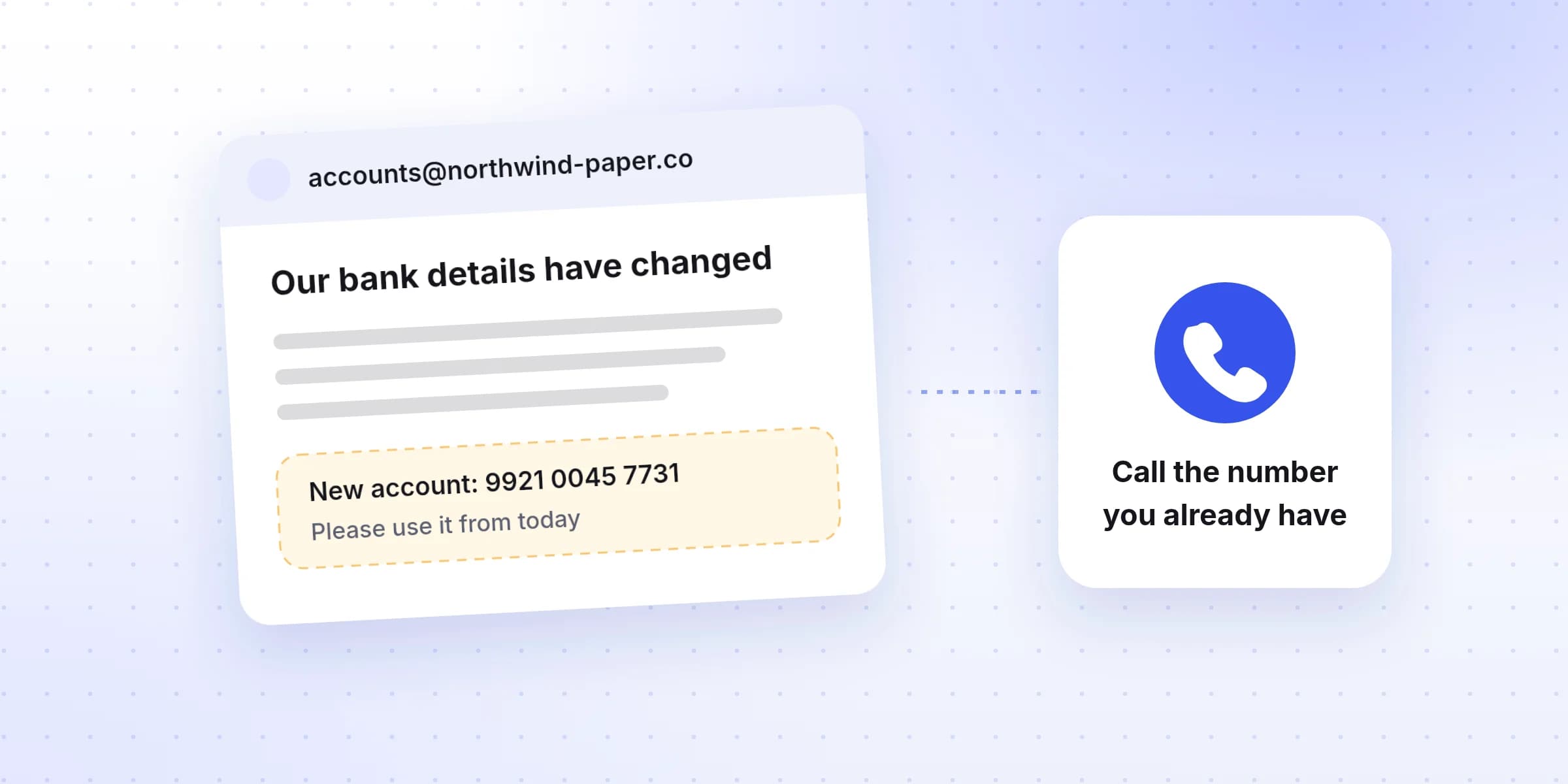
An email arrives from a supplier you've paid for years. Their bank has changed, it says, so please pay this month's invoice to the new account. The email looks right, the invoice looks right, and the amount is what you expected. If you pay it, the money is gone.
This is one of the most expensive frauds businesses face, and one of the easiest to stop. This guide explains how it works, what the numbers say, and the few habits that protect you.
How the scam works
The FBI calls it business email compromise. A criminal gets into a supplier's email, or into yours, or sets up an address that looks almost the same. They read the conversation, wait until an invoice is due, and then send new bank details at exactly the right moment.
Nothing about the email looks strange, because it often comes from the real account or quotes a real conversation. The only thing that changes is where the money goes.
$3.05 billion
Source: FBI Internet Crime Complaint Center, 2025 Internet Crime Report.
Losses reported to the FBI each year
Losses to fake supplier and boss emails, which the FBI calls business email compromise, in US dollars
The UK tells a more hopeful story. Banks there report this fraud as “invoice and mandate” fraud, and losses have fallen by about 40% since 2020. UK Finance, the banking trade body, reports that 2025 had the lowest losses and the fewest cases it has ever recorded.
UK losses to fake bank detail changes
What UK banks call invoice and mandate fraud, in millions of pounds
UK banks now also check that the name on an account matches the name you typed before a payment goes out, a check called Confirmation of Payee. It helps, but it can't catch a criminal who opened an account in a name close to your supplier's. The habits below still matter.
Would you pay these?
Try these four situations. Each one is based on how the scam usually plays out.
Would you pay these?
0 of 4 answered
Case 1
A familiar supplier says their bank has changed
- From
- [email protected] (the usual address)
- Says
- We've moved banks. Please pay invoice 2041 to our new account.
- Amount
- $1,204.20, the usual size
Case 2
The boss needs a payment made today
- From
- Your managing director's name, from a personal address
- Says
- I'm in meetings all day. Pay this new supplier now and keep it quiet until it's done.
- Amount
- $18,500
Case 3
A normal invoice, nothing changed
- From
- Your cleaning company, the usual address
- Bank details
- The same account as every month
- Amount
- $640, the same as last month
Case 4
The supplier phones you about new details
- Call from
- Someone saying they're from your supplier's accounts team
- Says
- We sent new bank details. Call me back on this number to confirm.
- Number given
- A mobile number you haven't seen before
The habits that stop it
- 1
Confirm every bank change by phone, on a number you already have
Never use the phone number in the email or on the new invoice. Use one from your own records, an older invoice or the supplier's website. - 2
Have two people check any change to a supplier's bank details
One person updates the supplier's details, another checks them before the first payment goes out. It takes two minutes and stops most attempts. - 3
Slow down when someone pushes you to pay fast
Urgent deadlines, requests to keep a payment quiet, and a reason why the usual process can't be followed are signs to slow down, not speed up. - 4
Look at the sender's address, letter by letter
Lookalike addresses swap one character: northwind-paper.co instead of .com, or an extra letter in the name. Your email app may hide the full address unless you tap on the name. - 5
Turn on two-factor sign-in for your email
Turn on two-factor sign-in for every email account in the business. A criminal in your inbox can send invoices to your customers in your name.
A checklist to pin up
Before paying an invoice with new bank details
- I called the supplier on a number I already had, not one from the email or invoice.
- Someone else checked the new details before the first payment.
- The sender's email address is exactly the one we've always used.
- Nobody is pushing me to pay faster than usual, or to keep it quiet.
Where Invoist fits
The hard part of this habit is noticing that the bank details changed at all, when they're one line on an invoice that otherwise looks normal. Invoist compares each invoice with the same supplier's earlier ones and holds any invoice with new bank details for you to check before it can be sent on. See how Invoist flags invoices. The phone call is still yours to make.