“Invoice automation” is usually sold to large companies with a finance department and a long list of approvals. But the idea is simple, and it fits a business with five people just as well: let software do the repetitive parts of handling a supplier invoice, and keep people for the decisions.
This post explains what that means step by step, which parts to automate first, what to ask before you choose a tool, and a plan for your first month.
The six steps of every supplier invoice
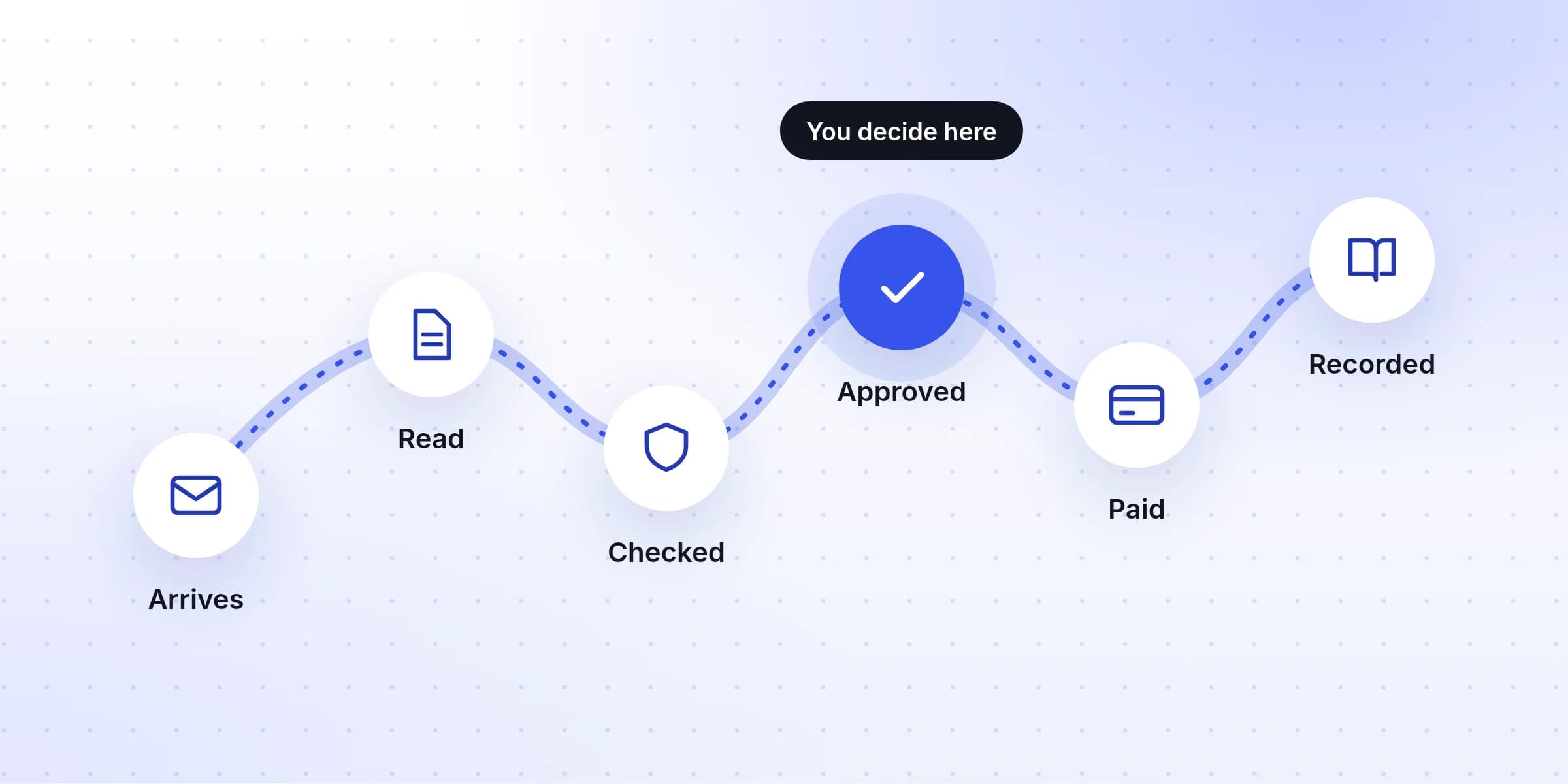
Every supplier invoice goes through the same six steps, whether you think of them that way or not. Some suit software well. Others should stay with a person, because they decide where your money goes.
- 01Arrives
By handInvoices land in several inboxes, the post and supplier websites.
Software does itOne email address collects them all. - 02Read
By handSomeone types the supplier, dates and amounts into the books.
Software does itSoftware reads the invoice and fills these in. - 03Checked
By handErrors and duplicates are found by luck, if at all.
Software does itRules catch errors and set aside anything unusual for a person. - 04Approved
By handApproval happens in a hallway or a chat message.
A person does itA person decides whether the business really owes this. - 05Paid
By handPayments are keyed into the bank one by one.
A person does itMoney leaving the business should need a person. - 06Recorded
By handThe PDF is saved somewhere, or not saved at all.
Software does itThe original is stored with its entry in the books.
Notice the pattern. Software is good at the steps that are about information: collecting it, reading it, comparing it and storing it. People should keep the steps that are about money: agreeing that the business owes it, and sending it.
What to automate first
If you only automate two things, make them collecting and reading. They take the most time, they're the most repetitive, and a mistake there is caught by the check that follows.
- Collecting. Send every invoice to one email address. This costs nothing and makes everything after it possible.
- Reading. Let software fill in the supplier, invoice number, dates, amounts and tax, so nobody types them.
- Checking for the obvious. Duplicates, totals that don't add up and changed bank details are easy for software to spot and easy for tired people to miss.
- Recording. Send each approved invoice to your accounting software with the original file attached.
Leave paying suppliers until last, and think hard before automating it at all. Many small businesses are happy to pay by hand from a list of approved bills, once a week.
Checking an invoice against what you ordered
Larger companies talk about “three-way matching”. It sounds technical, but it is a common-sense check: before paying, make sure three documents agree.
- What you ordered: the purchase order, or the quote you accepted.
- What you received: the delivery note, or simply someone confirming it arrived.
- What you're asked to pay: the invoice.
Most small businesses don't raise purchase orders, and that's fine. The same idea still works in a lighter form: does this invoice match what we agreed, and did we get it? A tool can help by showing what the same supplier charged last time, so an unusual amount stands out.
$3.05 billion
Source: FBI Internet Crime Complaint Center, 2025 Internet Crime Report.
This is why the checking step matters more than the reading step. Reading saves time; checking saves money. Whatever tool you use, make sure an invoice with new bank details always stops for a person, and that the person confirms the change by calling the supplier on a number they already had.
Questions to ask before you choose a tool
Most tools look good in a demo. These questions show the differences that matter day to day:
- Does it read my invoices well? Test it with your own, including photos and multi-page PDFs, not the sample in the demo.
- Does it tell me when it isn't sure? A tool that guesses silently is worse than one that asks.
- Does it catch duplicates and bank changes? Ask how, and try it with an invoice you upload twice.
- Does it work with my accounting software? Check that it sends bills there directly, or at least gives you a file your software imports.
- How is it priced? Per invoice, per user, or a monthly plan with a limit. Work out the cost at your busiest month, not your average one.
- Where is my data kept, and is it used to train AI? Invoices contain bank details and prices. The answer should be in the privacy policy, in plain words.
- Can I get my data out? If you leave, you should be able to export everything, originals included.
Working out whether it's worth it
You can estimate this in two minutes, with your own numbers:
- Time how long it takes to type in and check ten invoices, and divide by ten.
- Multiply by the number of invoices you handle in a month. That's your time today.
- Assume you'll still spend about a minute on each invoice that needs a closer look, and almost nothing on the rest.
- Put a cost on the hours saved, and compare it with the tool's monthly price.
For example, a business with 150 invoices a month that spends five minutes on each is spending twelve and a half hours a month. If a tool brings that down to two or three hours, it saves around ten hours a month. Your numbers will be different, which is the point of working them out.
Your first month
- 1
Week 1: collect invoices at one email address
Set up a single address for invoices and ask your suppliers to use it. Forward anything still arriving elsewhere. - 2
Week 2: test two tools
Run last month's invoices through two tools on free trials. Compare what each read against what you typed. - 3
Week 3: decide which invoices a person checks
Decide which invoices stop for a person, and who that person is. Connect the tool to your accounting software. - 4
Week 4: start using it, and time it again
Put new invoices through the new process. At the end of the week, time it again and compare with your starting number.
Common mistakes
- Automating a messy process. If invoices arrive in six places, software won't fix that. Collect them in one place first.
- Letting software pay. Keep a person between an invoice and your bank account.
- No one owns it. Someone needs to look at the invoices that are held for checking, every few days. Otherwise they pile up and bills are paid late.
- Skipping the test. A week of comparing results is the cheapest way to avoid choosing the wrong tool.
Where Invoist fits
Invoist covers the automated steps in this post: a single address for invoices, reading PDFs and photos, holding anything unusual (new bank details, odd amounts, likely duplicates) for you to check, and sending approved invoices to QuickBooks, Xero or Zoho Books with the original attached. Approving and paying stay with you. Plans start at $29 a month for up to 500 invoices, with a three-day free trial. See the plans or how Invoist flags invoices.